Phone Number on Invoices and Delivery Notes
With the Phone Number on Invoices and Delivery Notes plugin, the phone number stored in the customer account appears automatically on your PDF documents – without any template changes. Your shipping and accounting teams reach the customer much faster in case of questions or delivery issues.
Highlights
- 📞 Phone number automatically on invoice and delivery note
- 🧾 Enable separately per document (invoice and/or delivery note)
- 🏷️ Optional label in front of the phone number
- ⚙️ No template changes – ready to use right away
- 🌍 Controllable per subshop and language shop
🔧 Installation
- Get the plugin via the Shopware Store or upload it as a ZIP under Extensions → My Extensions
- Install and activate the plugin
- Reload the backend
- Configure the plugin (see below)
⚙️ Configuration
You can find the configuration under Extensions → My Extensions → Phone Number on Invoices and Delivery Notes → Configuration. The setting is available per sales channel.
| Setting | Description |
|---|---|
| Show phone number on the invoice? | Shows or hides the phone number on the invoice |
| Show phone number on the delivery note? | Shows or hides the phone number on the delivery note |
| Show label? | Displays a label (e.g. "Tel:") in front of the phone number |
Where does the phone number come from?
The phone number stored in the order or customer account is used. If no number is stored, the line stays empty.
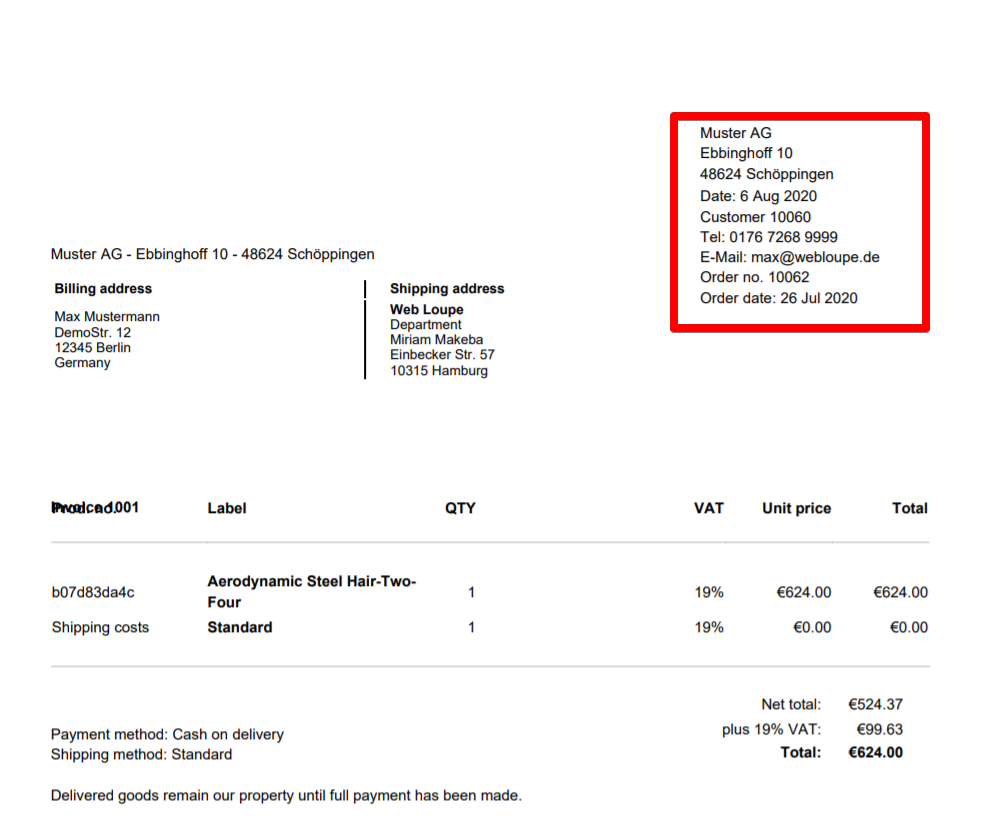
🧾 Result on the document
The phone number appears automatically in the address/customer block of the respective document.
🧩 Supported documents
- Invoice
- Delivery note
❓ FAQ
On which documents is the phone number shown?
On invoices and delivery notes. For each document you decide separately whether the number appears.
Do I need to modify the template manually?
No, the plugin handles the integration into the PDF documents automatically.
Can I show a label in front of the number?
Yes, showing a label in front of the phone number can be enabled optionally.
Does the plugin work with subshops and language shops?
Yes, the display can be controlled per subshop and language shop.
📬 Support
For questions, improvement suggestions or individual adjustments, contact us by email at shopware@webloupe.de.